
Imagine your company overpaid tax last year. Your customers deducted more TDS than your final liability, so the IRD owes you the difference. This year you should pay less. Instead, the return goes in, the full tax is paid, and last year's credit quietly disappears. Nobody stole it. It was simply never claimed.
This happens more often than most business owners realise, and in most cases it happens when the return is filed by an accountant or auditor on the client's behalf. The cause is one row in Annex 10 of the income tax return: the transfer of credit from the previous year. The IRD portal can bring last year's excess credit straight into this year's return, but only if the person filing asks it to. If they don't, the credit stays behind, and getting it back later is slow and uncertain.
Table of Contents
- What Annex 10 is
- How an excess credit arises
- The gap in the portal: credit is offered, not applied
- A worked example: Rs 1,30,000 paid for nothing
- How to check your own returns in five minutes
- What to do if the credit was missed: amend within a month, or assessment after
- What should change
- Sources
What Annex 10 is
Annex 10 is the part of the income tax return (D-03 for companies and firms, with similar sections in the other return types) where you list the tax that has already been paid for the year. It is the bridge between the tax you owe and the cash you still have to pay. Three kinds of rows go in it:
- TDS credits: tax deducted by your customers and other payers, identified by their PAN, voucher number, date and amount;
- Advance tax paid: your own installments under Section 94, paid in Poush, Chaitra and Ashadh;
- Transfer of credit (TC): the excess credit from an earlier fiscal year that was not used up there.
The first two are the ones everyone remembers, because they come with vouchers. The third has no fresh voucher, and that is why it gets missed.
How an excess credit arises
An excess credit appears whenever the tax already paid for a year is larger than the final tax for that year. Common reasons:
- High TDS businesses: contractors (1.5% TDS on contract payments), and consultants and service providers (1.5% to 15%) often have more TDS than the tax on their actual profit.
- A bad year: profits fell or turned into a loss, but customers kept deducting TDS on turnover.
- Over-estimated installments: the estimated return in Poush expected a good year that did not happen.
The law gives you two ways to recover it. Section 113 of the Income Tax Act lets the IRD set the excess against other tax you owe or refund it on application. In practice, very few businesses ask for a cash refund. The normal and fastest route is to carry the credit into the next return and use it against next year's tax. That is exactly what the transfer-of-credit row does.
The gap in the portal: credit is offered, not applied
When you prepare Annex 10 on the IRD taxpayer portal, there is a facility to transfer credit from an earlier fiscal year. You choose the earlier year, the portal checks the IRD's own record of that year's return, tells you how much can be transferred, and adds a TC row. It works well. The problem is that it is optional and silent:
- The portal does not add the credit automatically, even though it already knows the amount.
- It does not warn you when a credit exists and you are about to submit without using it.
- Once the return is submitted, the TC row cannot be added by simply editing the return later.
A second trap: updating TDS wipes the transfer
There is a further flaw that catches even careful filers. If you add the transfer-of-credit row first and then use the portal to update or re-fetch the TDS credits (pulling the TDS deducted against your PAN through the login), the Annex 10 list is rebuilt from the TDS records and the transfer-of-credit row is dropped. Nothing on screen warns you. The return looks complete, the TDS rows are all there, and the credit from last year has silently gone.
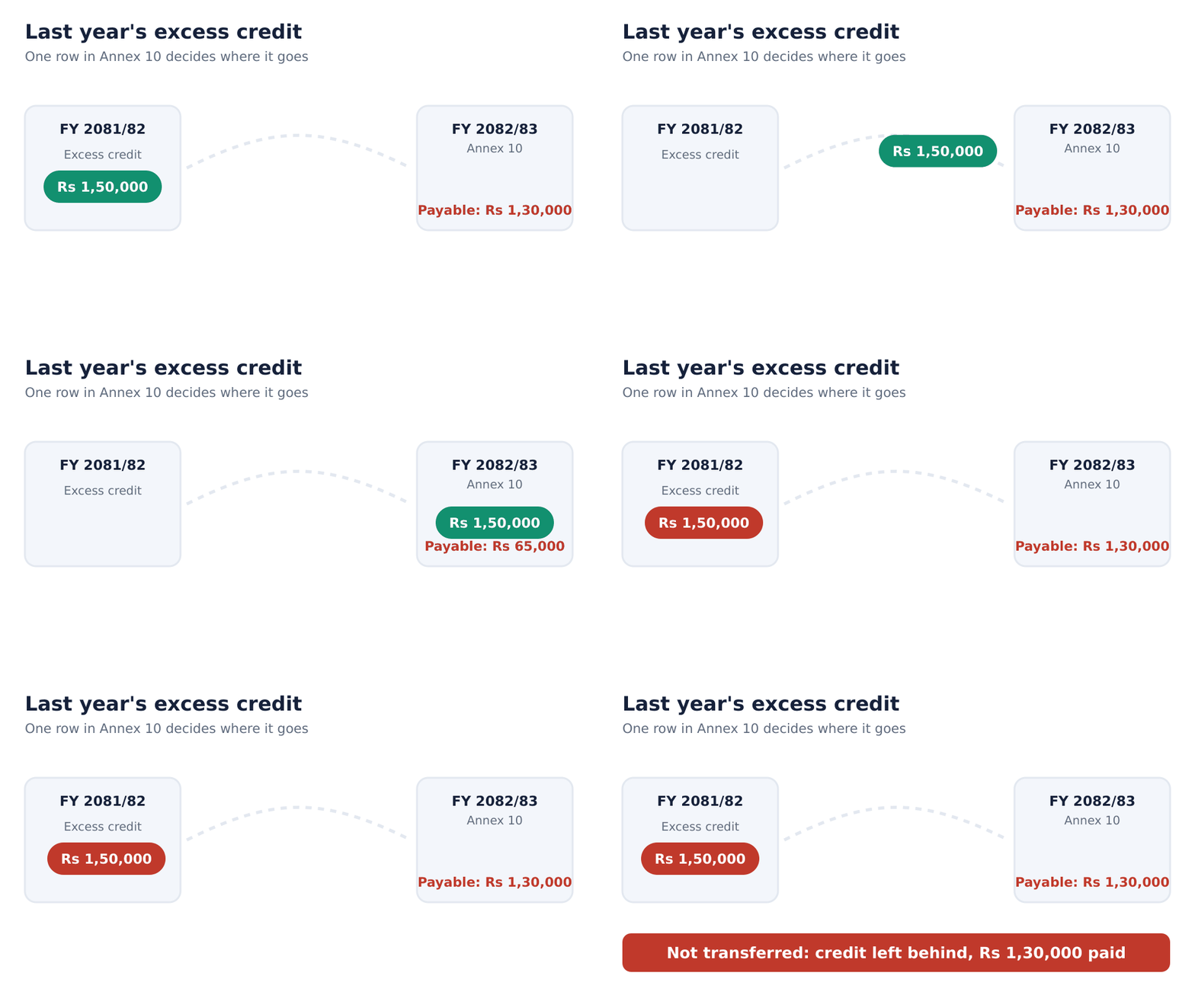
Put that next to the reality of filing season. An audit firm may file dozens of D-03 returns in the last weeks before the deadline, often from the audited figures, with the client's TDS list pasted in. The transfer step is easy to skip when nobody is checking for it, and the client, who sees a "tax paid" receipt, has no reason to suspect anything went wrong.
A worked example: Rs 1,30,000 paid for nothing
Take a construction subcontractor, Company A.
| FY 2081/82 | FY 2082/83 without transfer | FY 2082/83 with transfer | |
|---|---|---|---|
| Tax liability for the year | Rs 2,00,000 | Rs 2,40,000 | Rs 2,40,000 |
| TDS deducted by customers | Rs 3,50,000 | Rs 1,10,000 | Rs 1,10,000 |
| Transfer of credit from last year | - | 0 | Rs 1,50,000 |
| Tax payable with the return | Nil (excess Rs 1,50,000) | Rs 1,30,000 | Nil (Rs 20,000 carried forward) |
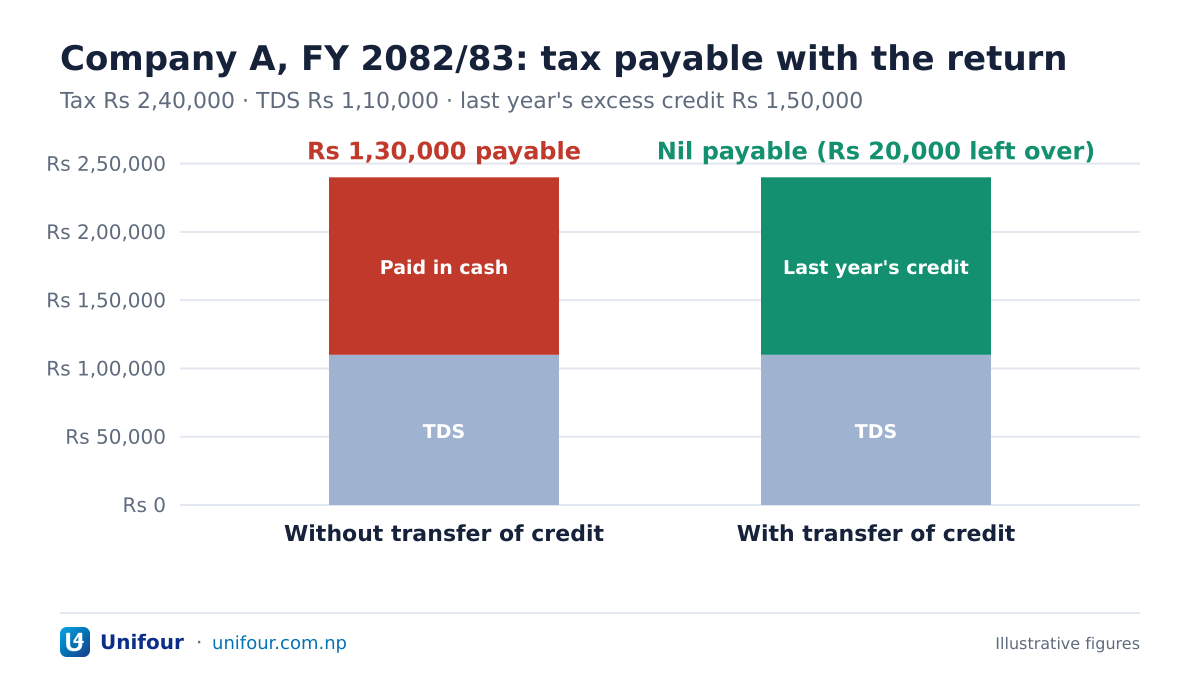
Without the transfer, Company A pays Rs 1,30,000 in cash that it did not owe, and the Rs 1,50,000 credit is still sitting against FY 2081/82 on the IRD's books. With the transfer, it pays nothing and still has Rs 20,000 to carry into FY 2083/84. For a small business, Rs 1,30,000 is a month's payroll.
How to check your own returns in five minutes
- Download the filed return PDFs for the last three fiscal years from the IRD taxpayer portal (or ask whoever filed them).
- In each year, compare the tax liability with the total credit in Annex 10. If credits were higher, that year left an excess.
- Open the next year's return and look for a transfer-of-credit row naming the earlier fiscal year. The amount should match the excess the IRD accepted.
- If the row is there, you are fine, provided it was still there in the submitted return (see the TDS update trap above). If the excess was partly used, check the remainder moved on again the following year.
- If the row is missing, go to the next section straight away. Time limits apply.
What to do if the credit was missed
What you can do depends on how quickly the mistake is found.
Within one month of filing: amend the return
If you notice the missing transfer within one month of submitting the return, file an amended return through the IRD taxpayer portal with the transfer-of-credit row added in Annex 10. This is by far the easiest route: no application, no visit, and the corrected return replaces the first one. It is one more reason to check Annex 10 straight after filing, not months later.
After the amendment period: the route in practice
Once the amendment window has closed, the portal will not let you add the row yourself. The textbook position is that the excess is still yours and the law gives other routes to correct a self-assessed return or claim the excess. In practice, however, most tax officers will tell you that a tax assessment has to be done before the credit can be recognised, and it is hard to get the case processed any other way. The usual route is:
- Write to your Inland Revenue Office (IRO) explaining that the excess credit of the earlier year was not transferred, with copies of both years' returns, the Annex 10 pages and the TDS statements.
- The office reviews the case through an assessment of the year concerned and then amends the record so the credit is recognised.
- Alternatively, apply for a refund or set-off under Section 113. The Act sets a two-year limit for the application, counted from the latest of the end of the year in which the excess was paid, the date it was paid, or the date of a decision on the case. After that, the law says the amount will not be refunded.
This takes visits, letters and months. Many businesses decide the amount is not worth the effort, which is how a benefit the law already gives them ends up lost. It is far better to get the transfer right when the return is filed.
What should change
The IRD already knows every taxpayer's excess credit, because it validates the amount when someone asks for a transfer. Four small changes would stop this loss for everyone:
- Pre-fill the transfer-of-credit row with the validated amount, which the filer could remove with a reason.
- Warn before submission when an unclaimed credit exists for the previous year.
- Keep the transfer row when TDS is refreshed, instead of rebuilding Annex 10 from the TDS records alone.
- Allow a longer self-correction window for Annex 10 credits, so a missed transfer can be fixed online without a full assessment.
Until then, the check is yours to make. If you are an auditor, add "transfer of credit checked" to your filing checklist. If you are a business owner, ask the person who filed your return to show you the Annex 10 page.
Sources
- Income Tax Act, 2058 (2002), Section 113 (tax refund and adjustment of excess). English text: nepallaws.com, Section 113; full Act on our Income Tax Act page.
- IRD taxpayer portal, income tax return Annex 10 and its transfer-of-credit check (the portal validates the transferable amount for the earlier fiscal year).
- Unifour practice experience: the TDS update trap in Annex 10, amended returns within one month, and recovering missed credits through the Inland Revenue Office after that (process and timelines vary by office).
- Related reading: TDS compliance in Nepal.
Written from practice in Kartik 2083. Office procedures differ; confirm the route with your IRO before applying.